Disaster Recovery Plan for a Small Business: A How-To Guide to Staying Operational

Running a small business means juggling daily priorities - but planning for disruptions should be one of them. A disaster recovery plan for a small business helps you stay operational when something unexpected happens, whether that’s a storm, a cyberattack, or a supply chain breakdown. This guide walks you through how to build a plan that’s clear, usable, and tailored to your business - without overcomplicating the process.

What Is a Disaster Recovery Plan for a Small Business?

A disaster recovery plan for a small business is a step-by-step framework that outlines how your company will respond to and recover from disruptions. It focuses on keeping essential functions running and getting you back to normal operations as quickly as possible.

Why It’s Worth the Effort

It’s easy to assume “it won’t happen to us,” but disruptions don’t need to be dramatic to cause real damage. Even a few hours of downtime can affect revenue, customer trust, and team productivity.

A solid plan helps you:

  • Reduce downtime and financial loss


  • Keep employees safe and informed


  • Maintain customer confidence


  • Meet insurance or regulatory requirements

“Small businesses are at particular risk as they often lack the resources to survive a catastrophic event. And when small businesses are unable to rebuild, the entire community continues to suffer. Jobs are lost, neighborhoods decline, and individuals and families endure further hardships.”

Step 1: Identify Your Real-World Risks

Start with a practical look at what could realistically interrupt your business.

Common Risks:

  • Severe weather (floods, tornadoes, winter storms
  • Power, Internet, or utility outages
  • Cybersecurity incidents
  • Vendor or supply chain disruptions
  • Public health and/or safety events

Then zoom out beyond your physical space:

  • Where is your data stored?
  • Who are your critical suppliers?
  • Do employees work remotely?

Many businesses miss these indirect risks - but they’re often the ones that cause the biggest delays.

Step 2: Understand the Impact (Business Impact Analysis)

Once you know the risks, the next step is understanding what they would actually cost you.

A Business Impact Analysis (BIA) helps you map out:

  • Which operations are most critical
  • How long you can afford downtime
  • What losses you’d face if systems go offline

Think Through Scenarios Like:

  • Loss of access to your building
  • Equipment or system failure
  • Internet or power outages
  • Inventory or shipping delays

Potential Impacts:

  • Lost or delayed revenue
  • Increased expenses (rush orders, overtime)
  • Customer dissatisfaction
  • Missed opportunities

Check out this ROI Calculator from our Disaster Recovery Vendor, Datto, for some help on this step at https://www.datto.com/rto/.

Step 3: Gather Your Essential Information

When something goes wrong, you don’t want to scramble for contacts or account details. Keep key information in one accessible place.

Include:

  • Employee and leadership contact information
  • Insurance policies and provider details
  • Vendor and service provider contacts
  • Key customer contacts


  • Banking and financial information
  • Offsite or cloud data storage access

Keep both digital and secure offline copies if possible.

Step 4: Map Out Your Emergency Procedures

This is the “what do we do now?” section of your plan.

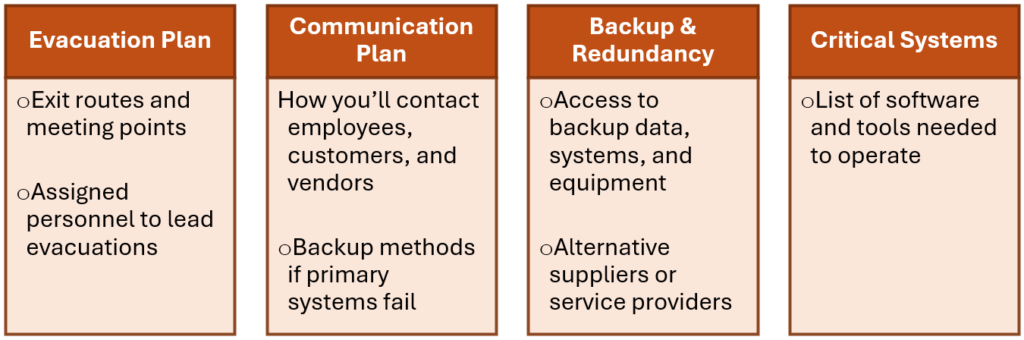
Cover the Basics:

Keep instructions clear and straightforward - this isn’t the place for complexity.

Step 5: Assign Roles (So Nothing Falls Through the Cracks)

Even a small team benefits from clear responsibilities during a disruption.

  • Designate a disaster recovery coordinator
  • Assign roles for communication, operations, and safety
  • Identify decision-makers

This doesn’t need to be formal - just clear enough that everyone knows their part.

Step 6: Train Your Team and Test the Plan

A plan only works if people know how to use it.

Keep It Practical:

  • Walk employees through the plan
  • Run occasional drills
  • Share quick-reference guides
  • Prepare message templates in advance

Regular reviews help you catch gaps before they become problems. We typically suggest that you sit down with your team and review all plans for disasters annually to ensure that everyone knows what to do, and to catch anything that has changed within the past 12 months.

Step 7: Use Technology to Your Advantage

You don’t need enterprise-level systems to build resilience - just smart use of available tools.

Helpful Options:

  • Cloud storage for remote access
  • Automated backups
  • Communication tools for alerts and updates
  • Monitoring systems for early warnings

Technology can keep your business running even if your physical location is temporarily out of commission. Check out our IT Management offerings if you want to see our recommended strategies.

Step 8: Plan Your Communication Strategy

Communication tends to break down right when you need it most - so plan ahead.

Set Yourself Up With:

  • Updated contact lists (multiple methods per person)
  • Pre-written messages for different scenarios (and different audiences: Press, Social Media, Emails to Clients)
  • A designated spokesperson who is responsible to maintain contact for the company
  • Clear guidelines for customer updates – What should they expect when? Have this labeled so they can rely on it – it might even put you ahead of your competition!

Consistent communication helps reduce confusion and maintain trust – especially if there’s a crisis. Anyone can do great in great conditions… but only the best can excel in the worst.

Step 9: Protect Your Records and Documentation

Accurate records make recovery smoother - especially when dealing with insurance or financial claims. Preparation here saves time when it matters most.

Best Practices:

  • Go paperless where possible
  • Back up files regularly
  • Store copies in separate locations
  • Document equipment and assets with photos or video when you get them
  • Document equipment and assets that are damaged as soon as possible after a disaster for your claim.

Keep supporting materials organized in an appendix for easy referencing: this makes it easier to find what you need during a high-pressure situation. Not sure what you should consider? The IRS has resources you can reference at https://www.irs.gov/businesses/small-businesses-self-employed/preparing-for-a-disaster-taxpayers-and-businesses.

Step 10: Keep It Updated and Usable

Your disaster recovery plan for a small business should evolve as your business does. New employees, new tools, or new vendors all introduce changes worth capturing. A good rule of thumb is to review your plan at least once a year - or anytime your operations shift in a meaningful way.

The American Red Cross has a program called the Ready Rating Program. It is a free, self-guided program designed to help businesses become better prepared for emergencies. Check it out at https://www.readyrating.us/. As an added bonus, Small business owners with 500 or fewer employees who complete an online self-assessment through Ready Rating are automatically eligible for the U.S. Chamber of Commerce Foundation’s Readiness for Resiliency (R4R) program too!

A disaster recovery plan for a small business doesn’t have to be complicated - but it does need to be intentional. The goal is simple: protect your people, keep your business running, and recover quickly when something goes wrong. The more thought you put in now, the easier it is to act when it counts.

Scroll to Top